

Three months ago I started using AI coding assistants for product work — ideation, discovery, requirements, architecture. The first few weeks were exhilarating. The next two and a half months were a grind.
The AI was too eager. It would hear a problem and sprint toward implementation before understanding the full scope. It would claim things were done when they weren’t. It would make confident assertions backed by data it hadn’t actually verified. And every new session started from scratch — no memory of what we’d decided, what I’d corrected, what we’d learned.
For most of those three months, I kept thinking the problem was the AI. If I just prompted it better, gave it more context, chose a better model. I built skills, added context, wrote rules — and things got incrementally better, but it still felt fragile. The AI would follow the process sometimes and ignore it other times, and I had no visibility into why.
It was only in the last two weeks that I found the structure that made everything click. The problem wasn’t the AI. The problem was that I was treating it like a tool when I should have been treating it like a system.
The moment that changed my approach
I was building out the chat UI for Veritas — our internal data research agent. The AI executed the implementation plan perfectly — 40 out of 40 tasks completed, every item checked off. It declared itself done.
On a whim, I asked: “How would you rate this repo?”
It immediately identified five major gaps it hadn’t mentioned. No tests for the new components. No error handling for WebSocket disconnects. No loading states. No mobile responsiveness. No way to verify the chat actually worked end-to-end. The plan it executed faithfully was incomplete — and it knew that, but only when asked.
That pattern kept repeating. The AI would execute exactly what was asked, declare completion, and move on. I’d ask “anything we should discuss?” and a whole new layer of issues would surface. Every time.
The fix wasn’t a better prompt. The fix was a rule: after completing any non-trivial implementation, run a self-assessment checklist before declaring done. Don’t wait to be asked. Question whether the plan itself was sufficient, not just whether you executed it.
One rule. Written into the system. The problem stopped recurring.
Working on the machine that builds the machine
That experience crystallized something for me. Every hour I spent making the AI better at following a process paid dividends across every future session. But every hour I spent doing the work directly — even with AI assistance — produced only that session’s output.
The leverage was in building the system, not using it.
So I started building what I now call the PM Workbench — a structured set of skills (slash commands that trigger AI workflows), evaluation frameworks, and feedback loops that compound over time. I’d had an early version focused on ideation, but what dramatically accelerated progress was Garry Tan’s gstack — an open-source framework for multi-platform AI skill management. Seeing someone else validate the pattern and ship a working implementation gave me both confidence that the approach was right and concrete patterns to build on.
The goal wasn’t to make the AI smarter. It was to make the process around the AI reliable enough that the output quality was predictable.
Here’s what that system looks like.
The context layer: teaching the AI your world
Before any workflow can produce good output, the AI needs to understand the context it’s operating in. This turned out to be a bigger investment than the workflows themselves — and a bigger payoff.
I built three layers of context into the workbench:
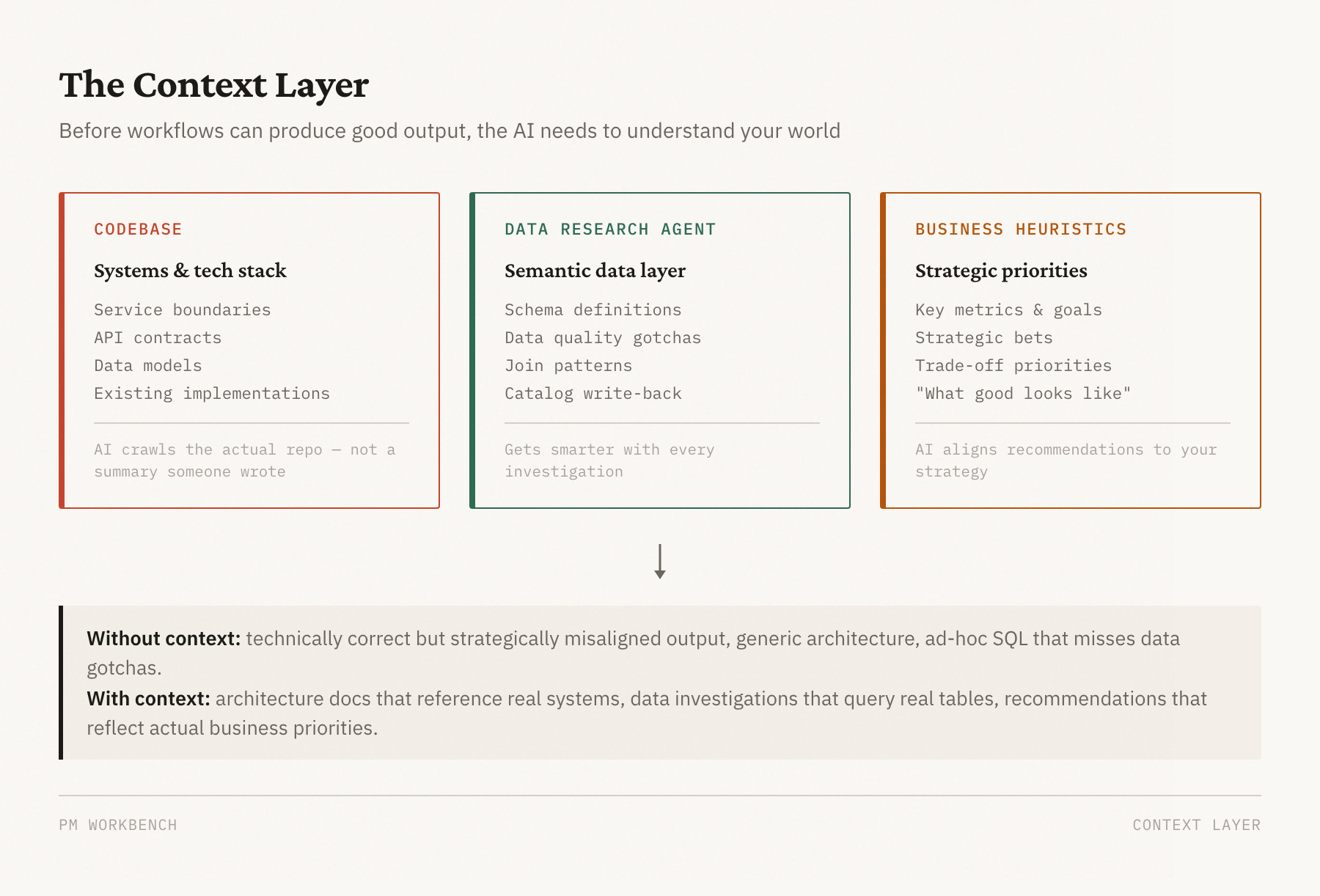
The codebase as ground truth. I had the AI crawl our entire repo — every service, every API contract, every data model. Not a summary someone wrote, but the actual code. When /eng-plan generates an architecture doc, it knows which systems exist because it’s read them. When it proposes where a new feature should live, it’s referencing real service boundaries, not guessing. This is the difference between an architecture doc full of generic placeholders and one that references your actual stack.
A dedicated data research agent. I built a separate agent with a semantic layer on top of our data warehouse — it understands our internal schemas, knows which tables to join, knows the gotchas (like “AVAILABLE status doesn’t mean bookable — check the hold flag”). When a PM asks “why did conversions drop?”, the agent doesn’t write ad-hoc SQL and hope for the best. It validates schema against the catalog, investigates in structured layers, and cites every number. Over time, the catalog gets smarter — when an investigation discovers an undocumented gotcha, it writes it back for the next PM.
Business heuristics and priorities. This one was the most underrated. I encoded how I think about the business — which metrics matter most, what our key strategic bets are, how we prioritize between competing goals, what “good” looks like for our customers. Without this, the AI generates technically correct but strategically misaligned recommendations. With it, the AI’s output reflects the same priorities I’d apply myself. When it has to make a judgment call about scope — cut this feature or that one — it leans toward the option that serves the strategic direction I’ve defined.
These three context layers are the foundation everything else sits on. The best workflow in the world produces mediocre output if the AI doesn’t understand your systems, your data, or your business.
The skills layer: structured workflows
The workbench has 24 slash commands covering the full PM lifecycle. The most important are the ideation pipeline:
/product-plan— challenges your premise, maps the problem space, locks scope into user stories with measurable success criteria/design-plan— establishes visual principles and produces per-screen specs/eng-plan— generates architecture with failure modes, implementation plan with test requirements/ideate— orchestrates all seven phases, auto-resolving routine decisions and surfacing only the subjective calls
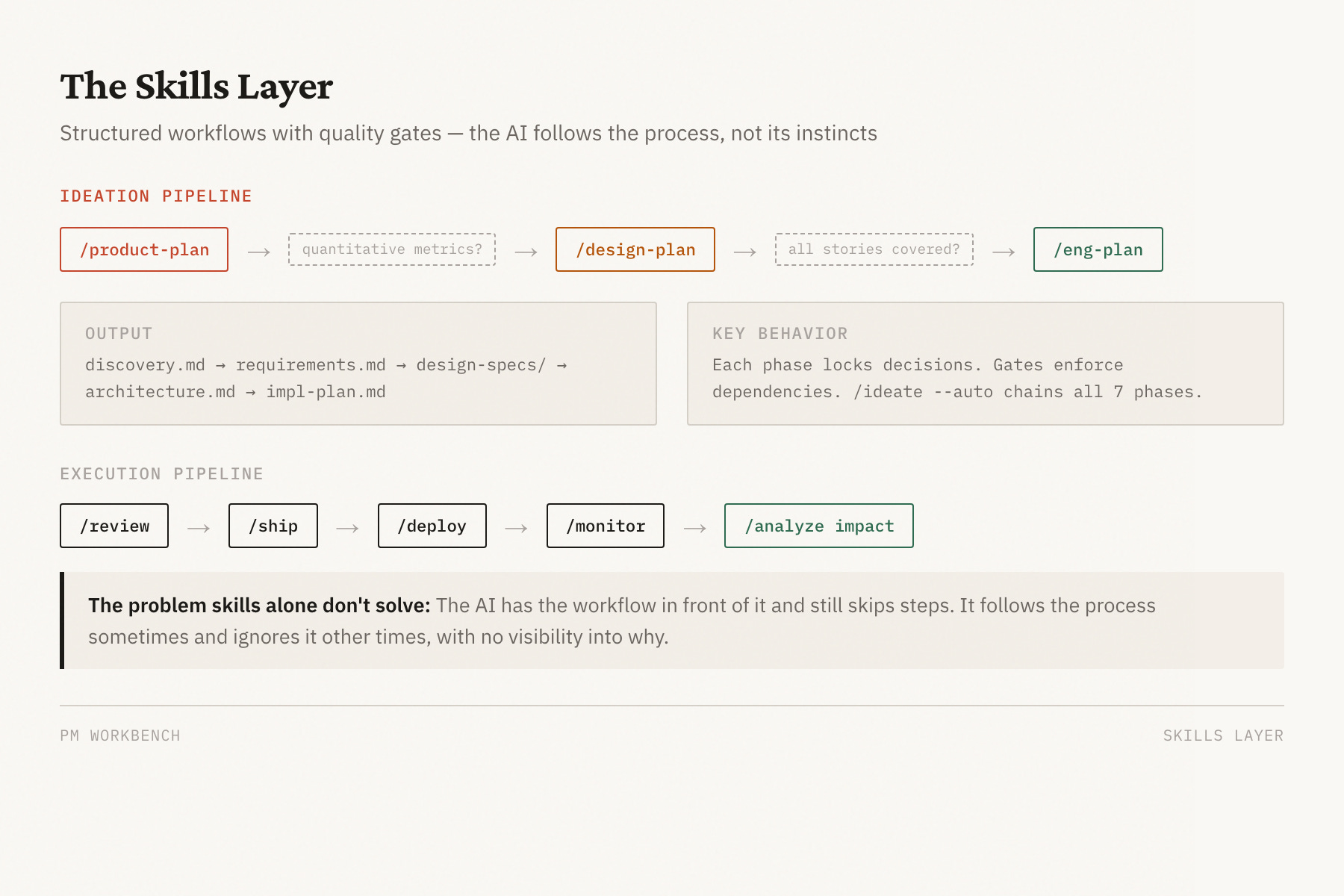
Each phase locks a decision category. You can’t renegotiate scope in Phase 5 without explicitly going back to Phase 2. This sounds rigid, but it prevents the most common PM failure mode: everything stays negotiable until deadline pressure forces bad decisions.
But skills alone weren’t enough. The AI would have the workflow documented in front of it and still skip steps. Which led to the harder problem.
The evaluation layer: measuring what matters
I needed to know whether the AI was actually following the process. Not “did it produce output” but “did it gather evidence before making claims, stay within scope, acknowledge uncertainty, and verify its work before declaring success.”
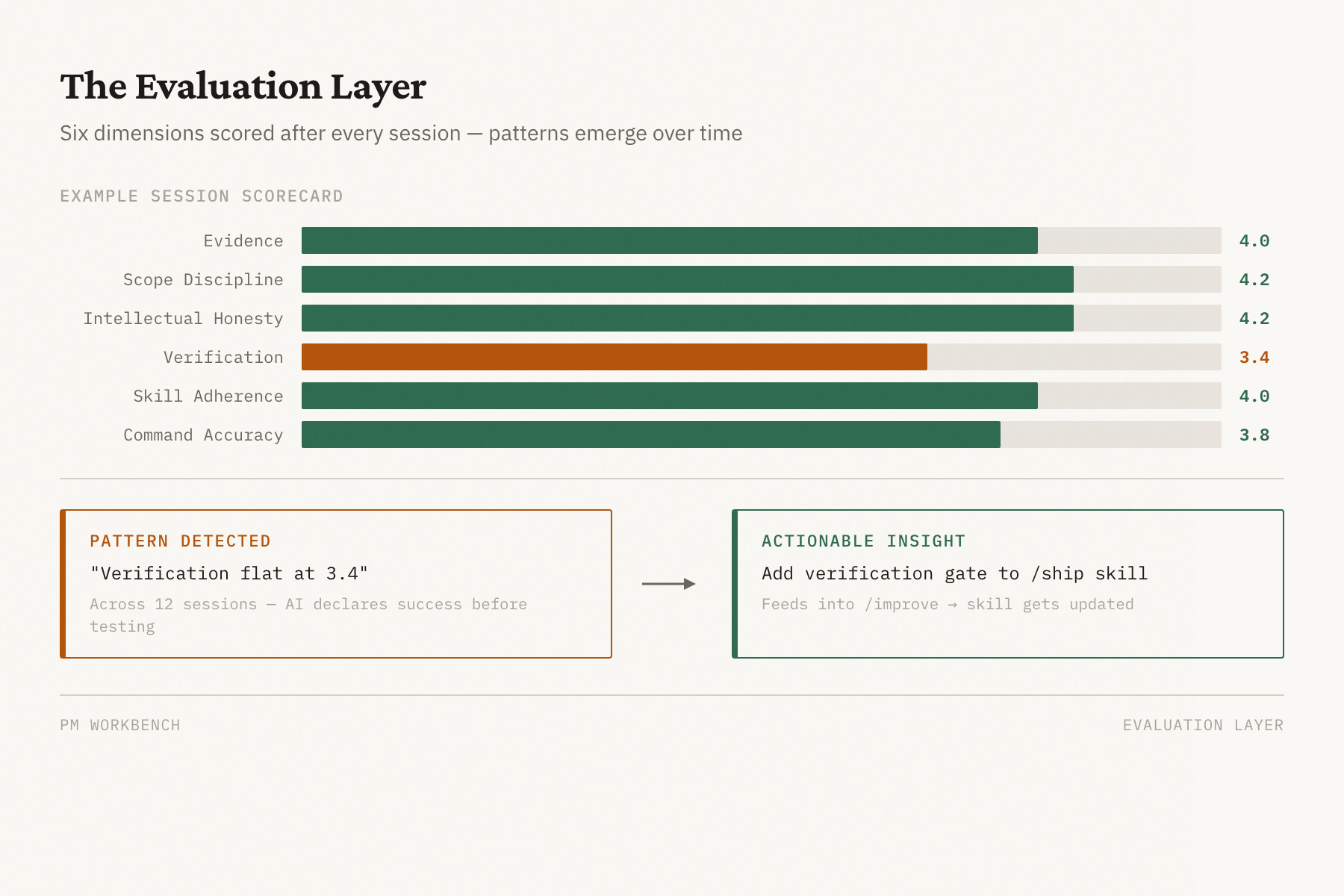
So I built a process evaluation system that scores every session across six dimensions:
Evidence — did it gather data before asserting conclusions?
Scope discipline — did it stay focused or scope-creep?
Intellectual honesty — did it acknowledge uncertainty or overstate confidence?
Verification — did it test before declaring done?
Skill adherence — did it follow the documented workflow?
Command accuracy — did it execute correctly at the mechanical level?
Each dimension gets a 1-5 score with written reasoning. The scores get logged. Over time, patterns emerge.
The feedback loop: compounding improvement
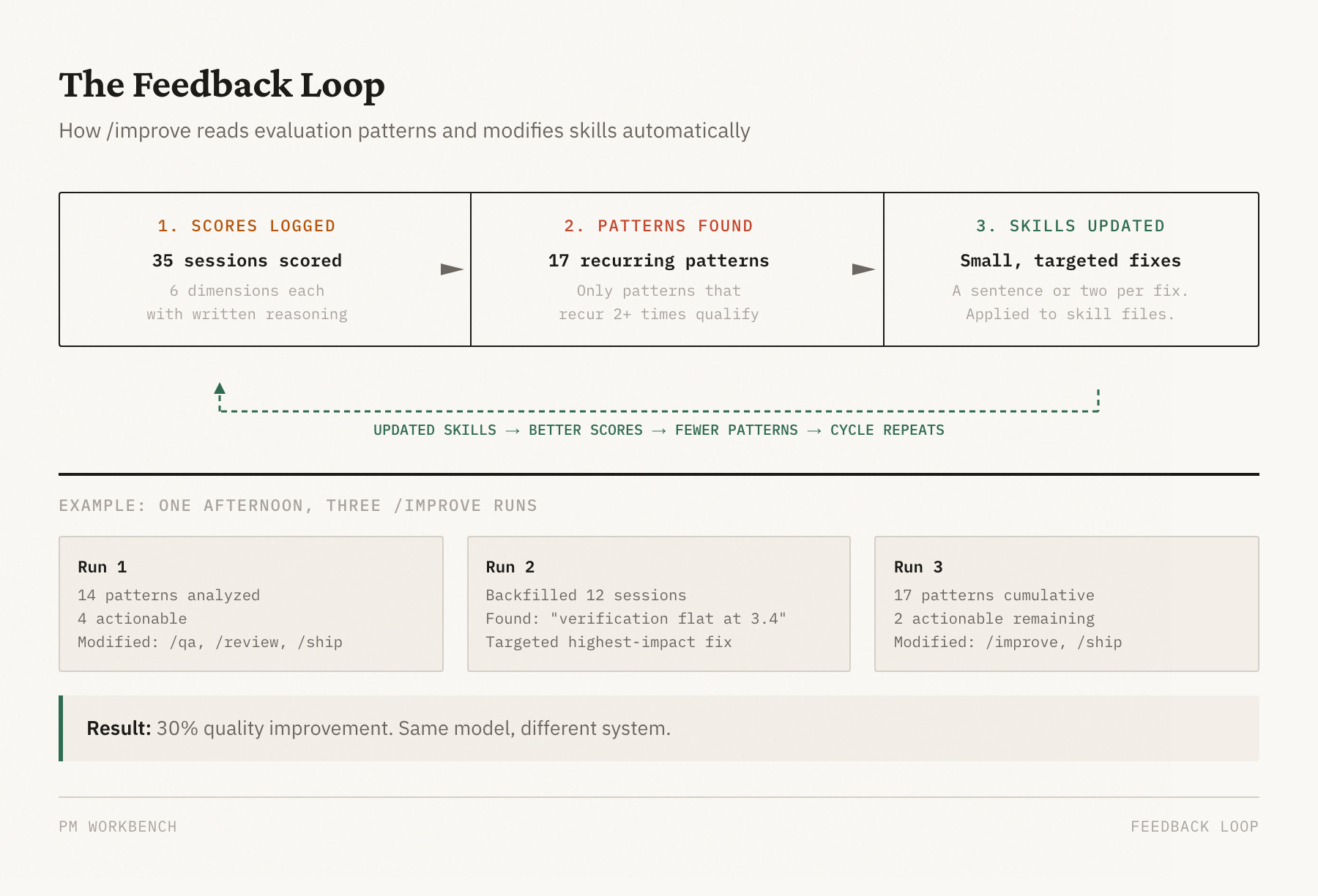
This is the part that surprised me most. The evaluation scores alone didn’t improve anything. What improved things was closing the loop — reading the patterns in the scores and modifying the skills to prevent the recurring failures.
I built an /improve skill that does this automatically. It reads process-eval results, identifies patterns that recur across multiple sessions, and proposes concrete changes to the skill files. A rule added here. A verification gate added there. A stronger instruction where the AI kept cutting corners.
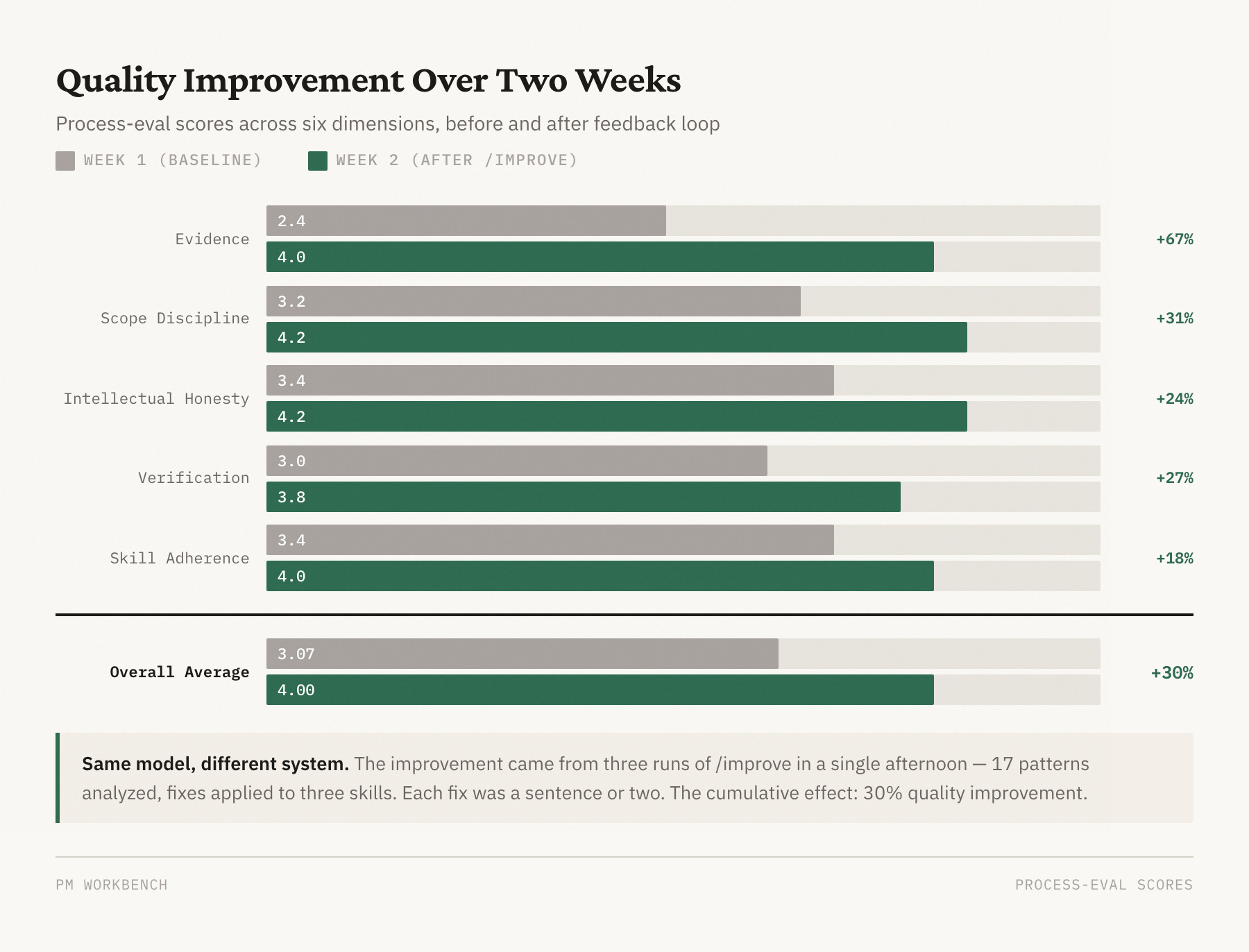
Here’s what the improvement arc actually looked like over two weeks on one project:
Early sessions (Week 1): Average process-eval score of 3.07 out of 5.0. The AI would declare “the root cause is X” after reading code for 30 minutes without checking production logs. It would report data as broken when it was actually a query truncation artifact. Evidence scores averaged 2.4 out of 5.
Late sessions (Week 2): Average score of 4.0, with best sessions hitting 4.67. Evidence scores climbed from 2.4 to 4.0 — a 67% improvement. The AI now gathers logs and production data before making claims, acknowledges when evidence is inconclusive, and runs verification before declaring success.
What drove the improvement: Three runs of /improve in a single afternoon analyzed 17 patterns across historical sessions, identified the actionable ones, and applied fixes to three different skills. Each fix was small — a sentence or two added to a workflow document. But the cumulative effect was dramatic.
The pattern that matters: I didn’t improve the AI. I improved the instructions the AI follows. The AI is the same model. The system around it is different.
What this taught me about AI-assisted product work
Most PMs I talk to are still in the “tune the prompt” phase. They’re trying to get better output by being more specific about what they want, giving more context, choosing the right moment to ask. That works, up to a point. But it doesn’t compound. Next session, you’re tuning again.
The shift that changed my productivity wasn’t a better prompt. It was treating my AI workflow as a system with measurable quality, feedback loops, and the ability to improve itself. Three things made the difference:
Structured workflows beat ad-hoc prompting. A seven-phase ideation pipeline with quality gates between phases produces more consistent output than “help me think through this feature.” The gates — like requiring quantitative success criteria before design begins — catch the skipped steps that ad-hoc prompting misses.
Evaluation is the foundation of improvement. If you can’t measure whether the AI followed the process, you can’t improve the process. The six-dimension scoring framework gave me visibility into patterns I couldn’t see from individual sessions. “Verification is flat at 3.4” is actionable. “The AI sometimes doesn’t check its work” is not.
Small rules compound faster than big redesigns. The self-assessment gate. The “don’t declare root cause without production evidence” rule. The “acknowledge uncertainty instead of overstating confidence” instruction. Each one is a sentence or two. Together, they drove a 30% quality improvement in two weeks. The system gets better every time someone uses it and feeds back what went wrong.
Building your own
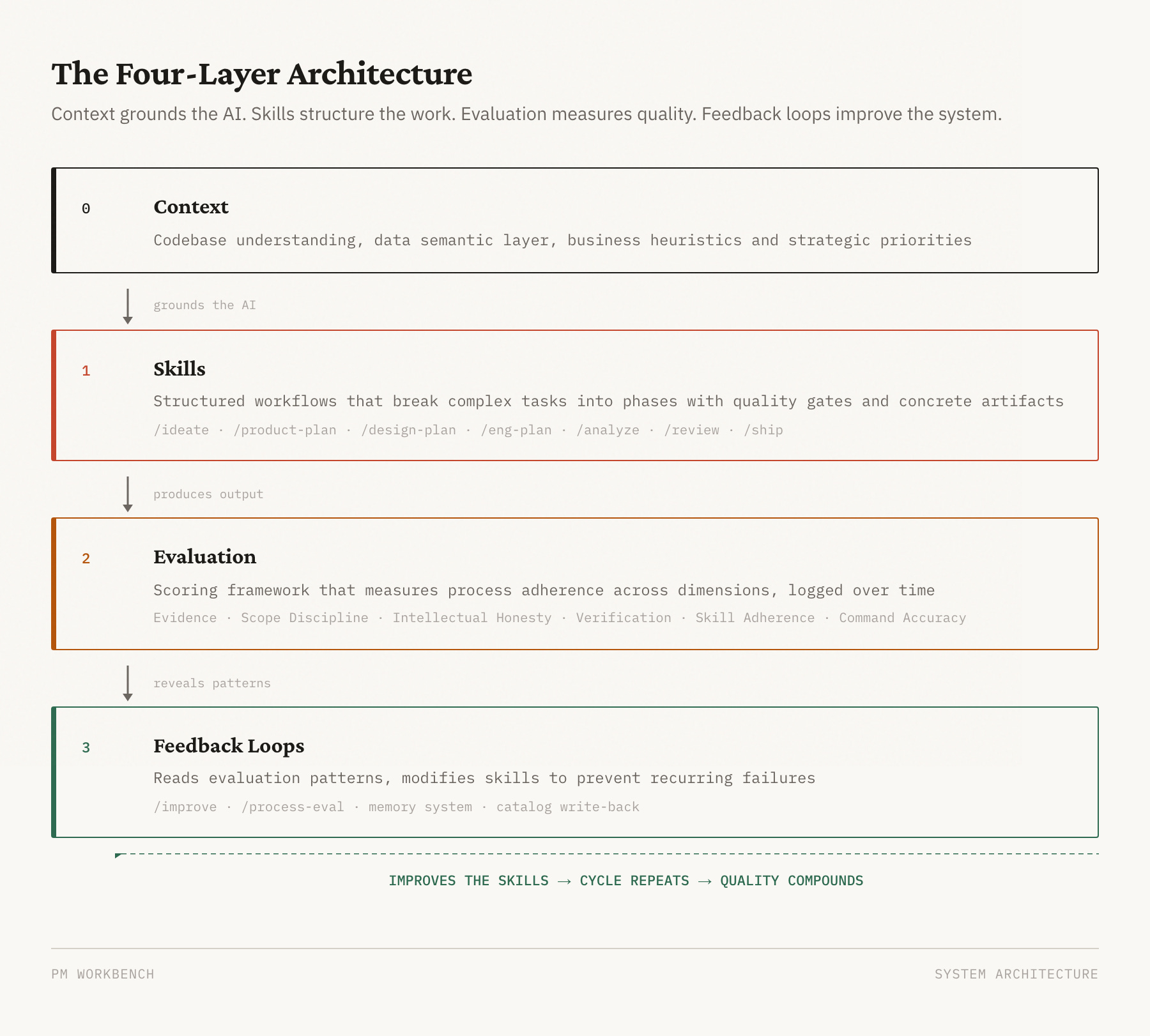
The specific workbench I built is internal — tuned to our systems, our data, our business. But the process is applicable to any project using AI. What matters isn’t the specific skills — it’s the four-layer architecture:
Context — codebase understanding, a data semantic layer, and business heuristics that ground the AI in your world
Skills — structured workflows that break complex PM tasks into phases with quality gates and concrete artifacts
Evaluation — a scoring framework that measures process adherence across dimensions you care about, logged over time
Feedback loops — a mechanism that reads evaluation patterns and modifies skills to prevent recurring failures
You can build this in any AI coding tool that supports custom instructions or skills — Claude Code, Cursor, or whatever comes next. It applies whether you’re building a product, writing code, doing research, or managing a team with AI. The model doesn’t matter as much as the system around it.
Start with one workflow you repeat often. Write down the steps. Add a gate where the AI tends to skip ahead. Measure whether it follows the gate. When it doesn’t, strengthen the instruction. Repeat.
There’s a limit to this approach I haven’t solved. The system improves the AI’s process, but it can’t improve the AI’s judgment. When a decision requires taste — which scope to cut, which trade-off to accept, which user pain matters most — no amount of workflow engineering helps. The system gets you to the decision faster and with better evidence, but the decision is still yours.
That’s probably the right boundary. The system handles the process so you can focus on the judgment. But I’d be lying if I said I knew exactly where that line is. I’m still finding it.